Connect Azure DevOps repositories
Connect an Azure DevOps organization so workspaces can read repositories and respond to pushes and pull requests. The connection uses Microsoft Entra OAuth and is separate from Entra browser SSO.
Before you start
You need an Azure DevOps organization with a Git repository, access to that organization and permission to register an Entra application. In Stackweaver, you need organization-owner or Manage VCS settings access. An organization API token initiating installation needs write scope on that organization.
Choose the public app URL and API URL first. Microsoft must be able to redirect your browser to the app, and Azure DevOps must be able to deliver hooks to the API.
| URL | Purpose |
|---|---|
https://app.example.com/vcs/azure-devops/callback | Entra redirect for this VCS connection. |
https://app.example.com/api/v2/vcs-connections/azure-devops/webhook | Service-hook receiver when the API is routed under the app origin. |
https://auth.example.com/idps/callback | External SSO callback; do not use it for the VCS connection. |
1. Register the Entra application
Use the manual steps below or the Terraform template. Both configure the identity application; neither replaces a user's Azure DevOps authorization.
-
In the Azure Portal, open Microsoft Entra ID > App registrations > New registration.
-
Name the app and select the intended account audience. Choose a single tenant for a single-directory installation; use multiple tenants only when that is intended.
-
Register the public VCS callback as a Web redirect URI. A local development URI is a separate allowed entry:
http://localhost:5173/vcs/azure-devops/callback -
Record the client ID and, for single-tenant mode, directory/tenant ID.
-
Under API permissions, add the Azure DevOps delegated permissions below. Consent is subject to your tenant policy; an administrator may need to approve it.
-
Under Certificates & secrets, create a client secret, record the expiry and copy its value immediately. The secret ID is not the credential.
| Permission | Used for |
|---|---|
vso.code | Repository/code access, including inherited service-hook access. |
vso.code_status | Commit and pull-request status checks. |
vso.project | Project/repository listing. |
The connection also requests offline_access for refresh tokens. Do not add separate
vso.hooks or vso.hooks_write scopes to this request. Use the
documented Azure DevOps scope hierarchy
and the Entra OAuth guide
when reviewing consent.
If Azure DevOps does not appear as an API, an Entra administrator can check its enterprise application with Azure CLI:
az ad sp show --id 499b84ac-1321-427f-aa17-267ca6975798
Only if that principal is absent, provision it in the intended tenant:
az ad sp create --id 499b84ac-1321-427f-aa17-267ca6975798
2. Configure the deployment
Docker Compose
Save persistent credentials in vcs.env, beside the Compose file. Replace placeholders,
keep the file private and use a strong, independently generated webhook secret.
AZURE_DEVOPS_CLIENT_ID=replace-with-client-id
AZURE_DEVOPS_CLIENT_SECRET=replace-with-secret-value
AZURE_DEVOPS_REDIRECT_URI=https://app.example.com/vcs/azure-devops/callback
AZURE_DEVOPS_TENANT_ID=replace-with-single-tenant-id
STACKWEAVER_WEBHOOK_BASE_URL=https://app.example.com
AZURE_DEVOPS_WEBHOOK_SECRET=replace-with-strong-webhook-secret
Leave AZURE_DEVOPS_TENANT_ID unset or set it to common only for the intended multitenant
configuration. STACKWEAVER_WEBHOOK_BASE_URL is the public API origin, without /api/v2.
Use a different origin if your API has its own host. Never maintain these values in
auto-generated .env.
docker compose up -d api orchestrator ansible-runner
docker compose logs api
Kubernetes / Helm
The chart's component env maps accept string values, not valueFrom objects. Merge the
same settings into api.env, orchestrator.env and ansibleRunner.env in a protected
values file. For example, the API portion is:
api:
  env:
    AZURE_DEVOPS_CLIENT_ID: "replace-with-client-id"
    AZURE_DEVOPS_CLIENT_SECRET: "replace-with-secret-value"
    AZURE_DEVOPS_REDIRECT_URI: "https://app.example.com/vcs/azure-devops/callback"
    AZURE_DEVOPS_TENANT_ID: "replace-with-single-tenant-id"
    STACKWEAVER_WEBHOOK_BASE_URL: "https://app.example.com"
    AZURE_DEVOPS_WEBHOOK_SECRET: "replace-with-strong-webhook-secret"
Repeat under orchestrator.env and ansibleRunner.env. These values appear in Deployment
specifications and Helm release data; restrict access and do not commit the file. Use your
normal protected deployment process rather than pasting secrets into a shared terminal.
Set STACKWEAVER_CHART_VERSION locally to the installed chart version shown by
helm list --namespace stackweaver. Preserve your release values; changing identity or VCS
settings is not an instruction to upgrade the platform.
helm upgrade stackweaver oci://ghcr.io/vhco-pro/charts/stackweaver \
  --version "${STACKWEAVER_CHART_VERSION:?Set the installed chart version}" \
  --namespace stackweaver --values my-values.yaml
kubectl logs deployment/stackweaver-api --namespace stackweaver
Use your installed release and Deployment names. The changed values roll the consumers.
3. Authorize a connection
- In the intended Stackweaver organization, open Settings > VCS Connections.
- Select Connect Azure DevOps.
- Enter the organization name from
dev.azure.com/<organization>, not its full URL. - Continue to Microsoft and authorize with an account that can access the target Azure DevOps organization.
- Confirm the browser returns to Stackweaver and the connection appears in the list.
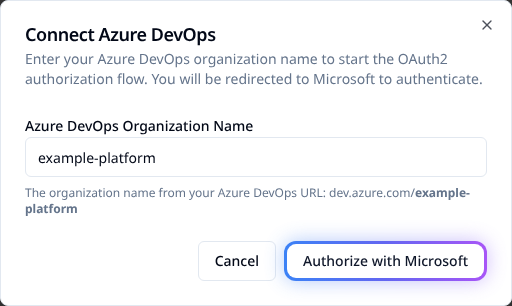
Authorization is interactive. There is no Stackweaver CLI command or repository YAML that replaces this consent step. API integrations can initiate the same browser flow:
curl --fail-with-body --silent --show-error --get \
  "$STACKWEAVER_URL/api/v2/organizations/my-org/vcs-connections/azure-devops/install" \
  --header "Authorization: Bearer $STACKWEAVER_TOKEN" \
  --data-urlencode 'ado_org=example-platform' \
  --data-urlencode 'return=/app/my-org/settings/vcs-connections'
Set the public origin and authorized token locally, and replace both organization names.
The response's meta.auth-url is the authorization destination, not a completed connection.
Follow it in the browser to complete consent and the callback.
4. Link a repository and verify hooks
- Create or edit a workspace. Select the connection, repository and branch.
- Azure DevOps repository identifiers use
ProjectName/RepositoryName. Check the working directory and speculative-run setting, then save. - Inspect Project settings > Service hooks in Azure DevOps for that repository.
- Push a harmless test change to the tracked branch and confirm the expected run.
- For PR plans, test a pull request and verify the speculative result and commit status.
A connection alone creates no subscriptions. Saving a linked workspace, playbook or inventory registers hooks for that repository, including an Ansible-only repository.
| Event | Expected behavior |
|---|---|
| Code pushed. | Queue matching workspace runs and sync tracked Ansible playbooks/inventories. |
| Pull request created. | Queue eligible speculative plan-only runs. |
| Pull request updated. | Refresh eligible PR plans after new commits. |
Matching includes the connected Azure DevOps organization as well as repository and branch. Identical project/repository names in another Azure DevOps organization do not identify the same connection.
Hook registration requires AZURE_DEVOPS_WEBHOOK_SECRET. It uses that value as the
subscription's Basic-auth password; unauthenticated deliveries are rejected. After changing
the secret or public URL, save one linked resource per repository to replace its
subscriptions. Otherwise old deliveries can fail with 401.
Manual service-hook fallback
If automatic registration is unavailable, use Project settings > Service hooks > Create subscription > Web Hooks:
-
Choose Code pushed and the specific repository.
-
Set the receiver URL to your public API origin followed by:
/api/v2/vcs-connections/azure-devops/webhook -
Use Basic-auth username
stackweaverand the configured webhook secret as password. -
Send All resource details, with message fields None, then test the subscription.
-
Repeat for Pull request created and Pull request updated.
For local development, use a public tunnel to the API. Azure DevOps cannot reach localhost.
Set STACKWEAVER_WEBHOOK_BASE_URL to that public origin, recreate consumers and re-save
linked resources. Do not expose credentials or unrelated local services through the tunnel.
Terraform setup
The maintained AzureAD template configures the enterprise application, app registration, delegated permissions and client secret. Download all files from the explorer into a private working directory and review them before applying.
The template manages the tenant's shared Azure DevOps enterprise application, reusing it when it already exists. Other applications can depend on that service principal. Review state ownership before adopting it, and do not destroy this configuration as routine Stackweaver cleanup. Check any deletion plan for shared tenant resources.
main.tf
# Stackweaver Entra ID app registration for Azure DevOps integration
#
# Provisions everything required for Stackweaver to authenticate with Azure DevOps via OAuth2:
#   - Azure DevOps enterprise application (service principal) in the tenant
#   - App registration with vso.code, vso.code_status, and vso.project API permissions
#   - Client secret
#
# Prerequisites:
#   - Entra ID administrator permissions
#   - Azure CLI installed and authenticated: az login
#
# Usage:
#   terraform init
#   terraform apply -var='redirect_uris=["https://your-stackweaver-domain/vcs/azure-devops/callback"]'
#
# After apply, copy outputs into vcs.env and recreate api, orchestrator and ansible-runner.
# Variables and outputs are defined in their adjacent files.

terraform {
  required_providers {
    azuread = {
      source  = "hashicorp/azuread"
      version = "~> 3.0"
    }
  }
}

provider "azuread" {
  # Authenticates via Azure CLI (az login) or ARM_* environment variables.
}

data "azuread_client_config" "current" {}

# ---------------------------------------------------------------------------
# Azure DevOps service principal
#
# Provisions the Azure DevOps enterprise application into this tenant.
# Required if Azure DevOps has not previously been used in the tenant.
# Resolves: AADSTS650052 "organization lacks a service principal for Azure DevOps".
# ---------------------------------------------------------------------------

resource "azuread_service_principal" "azure_devops" {
  client_id    = "499b84ac-1321-427f-aa17-267ca6975798" # Azure DevOps (global Microsoft app)
  use_existing = true                                   # Use existing SP if already provisioned
}

# Resolve delegated permission scope GUIDs from the Azure DevOps service principal.
# Using a data source avoids hardcoding GUIDs that Microsoft could rotate.
data "azuread_service_principal" "azure_devops" {
  client_id  = "499b84ac-1321-427f-aa17-267ca6975798"
  depends_on = [azuread_service_principal.azure_devops]
}

locals {
  # vso.code - read source code, commits, branches; inherits vso.hooks_write (service hooks)
  vso_code_id = one([
    for s in data.azuread_service_principal.azure_devops.oauth2_permission_scopes :
    s.id if s.value == "vso.code"
  ])

  # vso.code_status - read and write commit/pull request status (PR status checks)
  vso_code_status_id = one([
    for s in data.azuread_service_principal.azure_devops.oauth2_permission_scopes :
    s.id if s.value == "vso.code_status"
  ])

  # vso.project - read projects and teams, required to list repositories across all projects
  vso_project_id = one([
    for s in data.azuread_service_principal.azure_devops.oauth2_permission_scopes :
    s.id if s.value == "vso.project"
  ])
}

# ---------------------------------------------------------------------------
# App registration
# ---------------------------------------------------------------------------

resource "azuread_application" "stackweaver" {
  display_name = var.display_name

  web {
    redirect_uris = var.redirect_uris
  }

  required_resource_access {
    resource_app_id = "499b84ac-1321-427f-aa17-267ca6975798" # Azure DevOps

    resource_access {
      id   = local.vso_code_id
      type = "Scope"
    }

    resource_access {
      id   = local.vso_code_status_id
      type = "Scope"
    }

    resource_access {
      id   = local.vso_project_id
      type = "Scope"
    }
  }
}

# ---------------------------------------------------------------------------
# Client secret
# ---------------------------------------------------------------------------

resource "azuread_application_password" "stackweaver" {
  application_id = azuread_application.stackweaver.id
  display_name   = "${var.display_name} client secret"
  end_date       = var.secret_end_date
}
outputs.tf
output "AZURE_DEVOPS_CLIENT_ID" {
  description = "Set as AZURE_DEVOPS_CLIENT_ID in deploy/vcs.env"
  value       = azuread_application.stackweaver.client_id
}

output "AZURE_DEVOPS_CLIENT_SECRET" {
  description = "Set as AZURE_DEVOPS_CLIENT_SECRET in deploy/vcs.env"
  value       = azuread_application_password.stackweaver.value
  sensitive   = true
}

output "AZURE_DEVOPS_TENANT_ID" {
  description = "Set as AZURE_DEVOPS_TENANT_ID in deploy/vcs.env (single-tenant only)."
  value       = data.azuread_client_config.current.tenant_id
}
test/terraform.tfvars
# Example variable values for local/test deployments
# Copy this file to terraform.tfvars and fill in your values.

redirect_uris   = ["http://localhost:5173/vcs/azure-devops/callback"]
display_name    = "Stackweaver (dev)"
secret_end_date = "2027-01-01T00:00:00Z"
variables.tf
variable "redirect_uris" {
  description = "Frontend OAuth2 callback URLs."
  type        = list(string)
}

variable "display_name" {
  description = "Display name for the app registration in Entra ID."
  type        = string
  default     = "Stackweaver"
}

variable "secret_end_date" {
  description = "Expiry for the client secret (ISO 8601). Rotate before this date."
  type        = string
  default     = "2027-01-01T00:00:00Z"
}
Authenticate Azure CLI to the intended tenant, then run from the downloaded directory:
az login
terraform init
terraform plan -out=azure-devops.tfplan \
  -var='redirect_uris=["https://app.example.com/vcs/azure-devops/callback"]' \
  -var='display_name=Stackweaver'
Apply the exact reviewed plan:
terraform apply azure-devops.tfplan
For local plus public callbacks, supply both entries in redirect_uris when planning:
terraform plan -out=azure-devops.tfplan \
  -var='redirect_uris=["https://app.example.com/vcs/azure-devops/callback","http://localhost:5173/vcs/azure-devops/callback"]'
The provider also supports
service-principal authentication through ARM_CLIENT_ID, ARM_CLIENT_SECRET and
ARM_TENANT_ID. This template uses the provider's single-tenant application default;
it has no audience input. For a deliberate multitenant setup, adapt the app registration
and review its audience separately. Select the intended management tenant and a suitable
secret_end_date; do not assume a template default is your rotation policy.
Retrieve outputs privately, then configure the deployment as above:
terraform output AZURE_DEVOPS_CLIENT_ID
terraform output -raw AZURE_DEVOPS_CLIENT_SECRET
terraform output AZURE_DEVOPS_TENANT_ID
The -raw command prints the secret in plain text, and Terraform state contains it.
Protect both. The template is not a verified zero-downtime secret-rotation procedure.
Review its plan for password replacement before changing expiry; do not destroy the
working credential before consumers have a tested replacement.
Rotate and recover deliberately
Create a replacement secret, update vcs.env or the protected Helm values, and recreate
consumers. Verify token exchange and repository access before retiring the old credential.
If using Terraform, manage overlap explicitly and inspect the plan rather than assuming
an expiry edit preserves the old secret.
| Symptom | Check |
|---|---|
| Integration not configured. | Client ID/secret reached the API and workers after recreation. |
AADSTS650052. | Azure DevOps enterprise application exists in the intended Entra tenant. |
AADSTS650053 for hooks scope. | Do not explicitly request separate hooks scopes; inspect app permissions and the actual authorization request. |
Redirect mismatch / AADSTS50011. | Exact public callback under the app's Web registration and deployment setting. |
| No repositories. | Authorizing account's project access, delegated permissions, organization/tenant connection and activated Entra identity. |
Azure DevOps 401 or token refresh failure. | Account access, consent, credential expiry and organization policy. Refresh tokens can be revoked. |
| Hook missing or rejected. | Current public API origin, webhook secret, per-repository save and Service Hook delivery result. |
| PR plan/status absent. | Both PR events, speculative setting and vso.code_status; existing consent may need renewal after permission changes. |
An organization administrator may need to connect Azure DevOps to the intended Entra directory and have the user sign into that organization once. Re-authorize only after checking the cause and resources using the connection; deleting a shared connection is not the first diagnostic step. Preserve redacted errors and IDs for support.
Repositories return 403: Identity has not been materialized
- Confirm you selected the intended Azure DevOps organization and Entra directory.
- Sign into
https://dev.azure.com/<organization>once using the same Entra account that authorizes the Stackweaver connection, then retry repository listing. - If the organization is connected to another directory, have its administrator review Organization settings > Microsoft Entra. A directory change affects that organization; do not change it merely to clear an unexplained error.
- Re-authorize the Stackweaver connection only after the account/directory issue is resolved and you have checked the resources using the connection.
Inspect webhook delivery and PR status
Docker Compose
docker compose logs --tail=200 api | rg -i 'azure|webhook'Kubernetes
kubectl logs deployment/stackweaver-api --namespace stackweaver --tail=200 | rg -i 'azure|webhook'Check the Service Hook subscription's Test result and HTTP response as well as the API
log. A 401 hook response can mean the stored subscription still uses an old webhook secret;
save a linked resource for that repository after applying the current secret.
For missing PR status, check the app's vso.code_status delegated permission, current user
consent and both PR hook events. A permission added to the registration does not enlarge
already-issued tokens. Arrange renewed consent/re-authorization after reviewing the shared
connection's dependents, then test a PR and its status result.