Administer a Stackweaver installation
Use platform administration to manage installation-wide administrators, the OpenTofu version catalogue, and a read-only organization directory. Organization access remains separate: this role does not let you open another organization's workspaces or secrets.
Choose the right interface
| Task | Use |
|---|---|
| Declare the installation's administrators or restrict organization creation | Docker Compose environment configuration or Helm values. |
| Grant or remove an administrator | Settings > Platform Administrators, or the admin API. |
| Manage the version catalogue | Settings > OpenTofu Versions, or the Terraform/OpenTofu provider. |
| Find organizations on the installation | Settings > Organizations, or the read-only admin API. |
There is no Stackweaver CLI or management YAML resource for granting this role. Helm YAML configures the deployment; it does not replace organization membership or API resources.
What the role can and cannot do
| Platform administrators can | Organization access still requires |
|---|---|
| Add, enable, disable and delete catalogue versions, subject to deletion restrictions. | Membership and permissions in the target organization. |
| Grant and remove other platform administrators. | An existing owner to add you to the owners team when owner access is needed. |
| See each organization's admin email, member/workspace counts and creation date. | Membership before its directory row opens workspaces. Other rows say Not a member. |
Being an organization owner does not grant the platform role. Organization owners select their own default OpenTofu version from the catalogue under Organization settings.
Declared and granted administrators
| Type | Controlled by | How access changes |
|---|---|---|
| Declared | The deployment's list of verified email addresses. | Add an address and have the user sign in. Remove an address and restart or redeploy the API with the updated configuration. |
| Granted | Another admin, through the UI or API. | A grant or removal takes effect on the next request, without signing out. |
Declared administrators carry a Declared by the deployment badge and cannot be removed through the UI or API. A granted administrator can remove themselves. Keep a controlled, usable declared account so you can recover access.
Stackweaver matches declared addresses case-insensitively against the verified email at sign-in. A granted administrator whose address is added to the list becomes declared at their next sign-in. A declared administrator signing in with a verified address outside the list loses the role at that sign-in. Existing browser sessions do not re-evaluate the declared email list on each request.
Declare only addresses you control at every identity provider used by the installation. Someone able to register and verify a declared address at any trusted provider could receive platform administration access.
Grants, removals, declarations and withdrawals create activity records outside any organization. The records identify the actor and affected user; startup reconciliation uses the system as the actor.
Declare administrators in the deployment
Before changing access, confirm you control the declared accounts and can sign in through the configured identity provider. Replace the example addresses with verified addresses from your own installation.
Docker Compose
Add this to the hand-managed deploy/sso.env file:
[email protected],[email protected]
STACKWEAVER_ORGANIZATION_CREATION=platform-admins
The second setting is optional. Its default, everyone, lets any signed-in user create an
organization; platform-admins restricts creation to platform administrators.
From deploy/, recreate the API using your installation's normal Compose files and any
tunnel or other overrides:
docker compose up -d --no-deps api
A plain container restart does not reload a changed Compose environment file. Do not edit
the generated deploy/.env for these settings. After recreation, sign in with a declared
address and check Settings > Platform Administrators for the declaration badge and
Deployment settings for the expected organization-creation policy.
Kubernetes with Helm
Save these overrides as platform-values.yaml:
platform:
  admins:
    - [email protected]
    - [email protected]
  organizationCreation: platform-admins
Set RELEASE, NAMESPACE and CHART_VERSION to your existing release, namespace and
installed chart version. Preserve the release's other values for this settings-only
change:
helm upgrade "$RELEASE" oci://ghcr.io/vhco-pro/charts/stackweaver \
  --namespace "$NAMESPACE" --version "$CHART_VERSION" \
  --reuse-values --values platform-values.yaml
Wait for the API rollout, sign in as a declared user, then check the badge and policy on Settings > Platform Administrators. This changes access policy; review the addresses before applying it. It is not an instruction to upgrade the platform version.
Bootstrap and external identity setups
When the declared list contains no address, the API falls back to ZITADEL_ADMIN_USERNAME.
The bundled installers set this to their bootstrap human administrator's email. The Helm
chart uses zitadel.init.adminUsername with bundled Zitadel.
With an external Zitadel (zitadel.bundled: false), explicitly set platform.admins.
The chart cannot infer an external bootstrap account. If neither the list nor a bootstrap
address is configured, the API logs a warning and cannot declare an administrator. Adding
an address takes effect when that person signs in; startup reconciliation only withdraws
stale declarations.
The platform Settings pages
Platform administrators see a Platform section below personal settings. Its pages are:
- Platform Administrators (
/settings/platform/administrators): administrators and the read-only deployment policy. - OpenTofu Versions (
/settings/platform/terraform-versions): the shared catalogue. - Organizations (
/settings/platform/organizations): the searchable directory.
Other users do not see this section. The platform pages and authenticated admin API calls return not found when the caller lacks the required access.
Add or remove an administrator
- Have the person sign in to Stackweaver once so their account exists.
- Open Settings > Platform Administrators, then Add administrator.
- Enter the account's full email address and submit. A successful grant adds it to the list. No account has this email address means no matching account exists.
- To remove a granted administrator, open their row's actions menu, choose Remove administrator, then confirm. Their organization memberships remain unchanged.
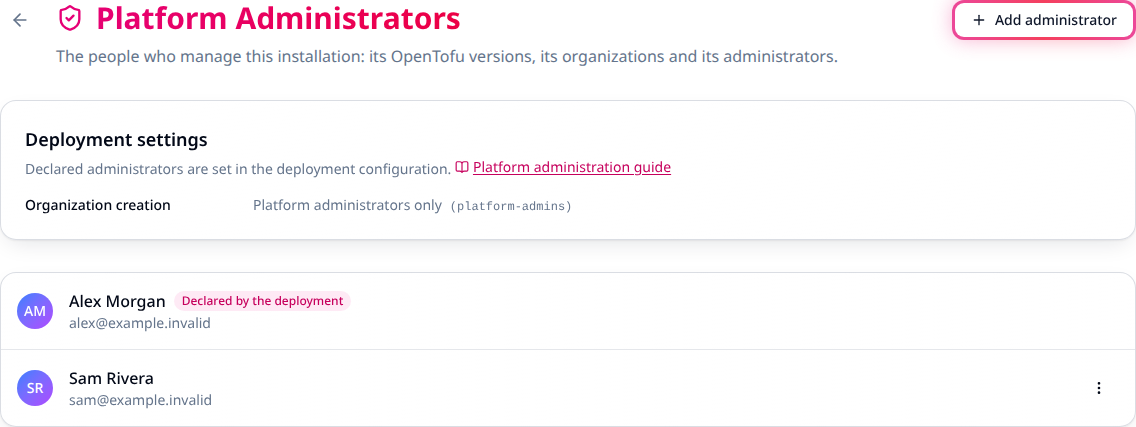
Generated example data. Declared accounts have a badge and no remove action.
Inspect the organization directory
Open Settings > Organizations and search by organization name. Check its contact, counts and creation date. Open appears only for organizations you belong to; Not a member does not provide a way to bypass membership.
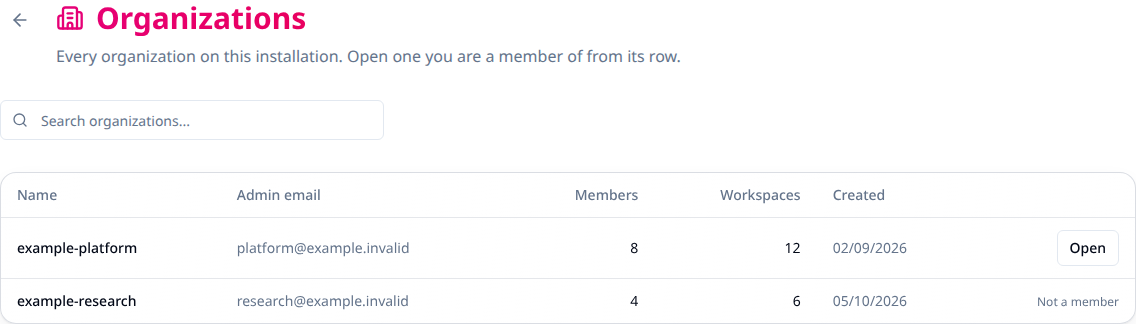
Generated example data. Directory visibility does not grant organization access.
Platform admin tokens
For scripts and the provider, create a personal token with the platform administration scope:
- Sign in as a platform administrator and open Settings > API Tokens.
- Choose Create Token, provide a description and optionally an expiry date.
- Select Platform admin: this token may call the install-wide admin API, then create the token. Save the one-time value in your secret store.
- Check the token's Platform admin badge and verify a read-only admin request below.
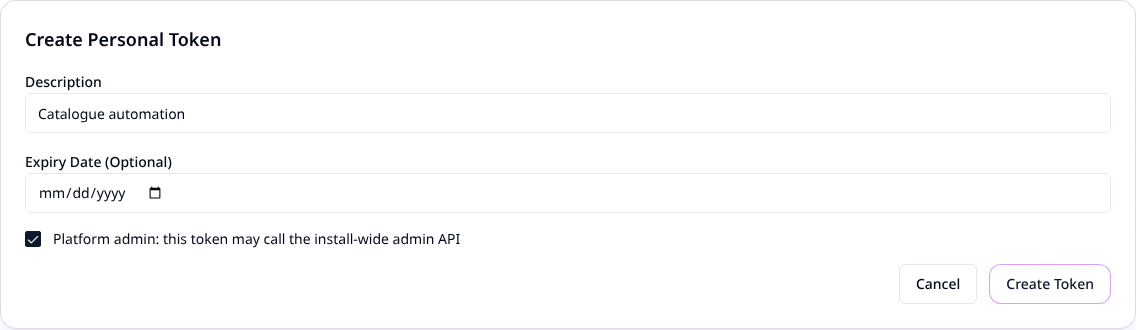
Generated example data. The form is prepared without creating or exposing a token.
Only a platform administrator can create this token. A plain personal token, a token from
terraform login, and organization/team tokens cannot call the admin routes, even if
their owner is a platform administrator. A Zitadel access token is not a Stackweaver API
credential; use a tfe- API token.
Inside organizations, a platform admin token has its owner's ordinary membership and permissions. Removing the owner's platform role stops install-wide access on the next request; it does not revoke their organization access or turn the token into an invalid personal token.
The platform API
Set STACKWEAVER_URL to the HTTPS API origin of your installation, without /api/v2
or a trailing slash. Supply TFE_TOKEN from your secret store; do not paste tokens into
command history. This read lists current administrators:
curl --fail-with-body --silent --show-error --get \
  "$STACKWEAVER_URL/api/v2/admin/users" \
  --header "Authorization: Bearer $TFE_TOKEN" \
  --data-urlencode 'filter[admin]=true'
Expect a JSON:API users list with is-admin and platform-admin-declared attributes.
To look up one existing account before granting access:
curl --fail-with-body --silent --show-error --get \
  "$STACKWEAVER_URL/api/v2/admin/users" \
  --header "Authorization: Bearer $TFE_TOKEN" \
  --data-urlencode '[email protected]'
Use the returned account ID as USER_ID, after checking its email. This action grants
installation-wide privileges immediately:
curl --fail-with-body --silent --show-error --request POST \
  "$STACKWEAVER_URL/api/v2/admin/users/$USER_ID/actions/grant_admin" \
  --header "Authorization: Bearer $TFE_TOKEN"
Expect the returned user's is-admin to be true, then repeat the administrator-list
request to confirm. To remove a granted administrator, use the same request with
revoke_admin in place of grant_admin. This withdraws platform access immediately.
Do not revoke your own only usable granted account without a working recovery path.
The available routes are:
GET    /api/v2/admin/users
POST   /api/v2/admin/users/:id/actions/grant_admin
POST   /api/v2/admin/users/:id/actions/revoke_admin
GET    /api/v2/admin/organizations
GET    /api/v2/admin/organizations/:name
       /api/v2/admin/terraform-versions
The last route supports catalogue operations; check the API reference for their methods and schemas.
| Operation | Purpose or failure behavior |
|---|---|
| User lookup | Requires filter[admin]=true or q with one full email address. Invalid or missing lookup parameters return 400; this is not a directory of all accounts. |
| Grant | An already-granted administrator returns 400. A declared administrator stays unchanged. |
| Revoke | A non-admin returns 400; a deployment-declared administrator returns 422. |
| Organization list or read | Returns summaries without member lists, settings or tokens. |
For authenticated callers, missing platform standing or a missing platform-admin token
scope returns 404. GET /api/v2/account/details and GET /api/v2/platform/settings are
available to signed-in callers without that role. Account details report is-site-admin,
platform-admin-declared and permissions.can-create-organizations; platform settings
report organization-creation. See the API reference for operation schemas.
Manage catalogue versions with Terraform or OpenTofu
Use the native provider's stackweaver_terraform_version resource or its
tfe_terraform_version alias with a platform admin token. Follow the
provider setup for the hostname, credentials and version pinning.
Save this example alongside that provider configuration:
variable "opentofu_version" {
  type = string
}

variable "opentofu_download_url" {
  type = string
}

variable "opentofu_sha256" {
  type = string
}

resource "stackweaver_terraform_version" "approved" {
  version = var.opentofu_version
  url     = var.opentofu_download_url
  sha     = var.opentofu_sha256
  enabled = true
}
Supply the version, Linux/amd64 archive URL and its verified SHA-256 from the release you
intend to offer. For other runner architectures, configure the provider's archs entries
as described in its resource reference. Do not use a dummy checksum or an untrusted binary.
Review the plan before applying:
terraform plan
terraform apply
terraform state show stackweaver_terraform_version.approved
Check the result under Settings > OpenTofu Versions. Use tofu for the same sequence
with OpenTofu. Set enabled = false to disable
a catalogue entry. Deletion is refused for official entries and versions assigned to a
workspace. A catalogue change is shared across the installation; review its effect before
applying. The provider does not expose a role-grant resource for this guide's admin actions.
Recovering a lost login
If a declared administrator cannot sign in, recover the identity account through your
Zitadel administrator or your tested identity recovery procedure. Stackweaver does not
manage identity passwords. The Zitadel console is normally at /ui/console on the auth
host; see Zitadel setup.
If you have deployment access and another usable identity account, add its verified email to the declared list, redeploy or recreate the API, then have that user sign in. Changing the list does not fix a password, create an identity account or verify its email.
For installations using the bundled initializer, a persisted administrator PAT may support
identity recovery: Docker Compose uses /pat/admin.pat in the zitadel-pat volume, and
Kubernetes persists admin-pat in the Zitadel Secret. This requires a still-valid credential
with the necessary Zitadel permissions. External identity installations may use a different
credential source. Protect it as an identity administrator secret; use the recovery
procedure for your deployed identity version rather than assuming it always works.
| Symptom | Check |
|---|---|
| Platform pages are missing or show not found. | Confirm the account signed in after declaration, its verified email matches, and the API loaded the intended deployment list. |
| UI works but the provider or admin API returns 404. | Use a personal token with Platform admin selected and confirm its owner still has the role. |
| A declared account cannot be removed in the UI. | Remove its address from deployment configuration and reload the API configuration. Check the bootstrap fallback if the list becomes empty. |
| Admin lookup finds no account. | Have the person sign in first, then use their complete account email address. |