Edit workspace settings
Update a workspace in place instead of recreating it. Review what the next run will execute before changing its configuration source, working directory, engine version or automation settings.
Changing a repository, branch or working directory can point existing state at different configuration. It does not move state to another workspace. Review a fresh plan before applying, especially when auto-apply is enabled.
Edit through the UI
- Open the intended workspace and choose Edit in its header.
- Change the required fields. Check the repository, branch and working directory together.
- Review any source-change warning. The absence of a warning does not prove a change is safe.
- Choose Update Workspace, reopen the dialog and confirm the stored values.
- Queue a reviewable plan when ready. Check the resulting configuration before approving apply.
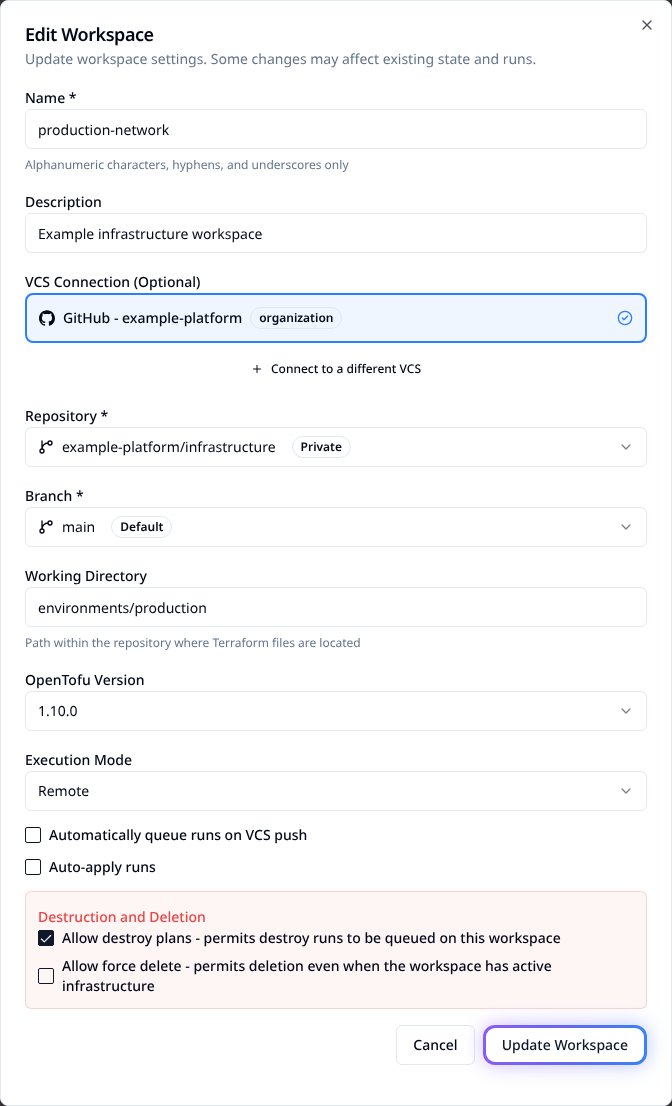
The maintained example uses synthetic data. No settings are saved during capture.
Decide what needs a plan or additional review
| Setting | Consequence |
|---|---|
| Name and description | Change identification. A rename changes name-based links and API addressing. |
| Connection, repository, branch, working directory | Choose the configuration read by future work; compare it against existing state. |
| OpenTofu version | Changes the engine used for runs. Check configuration, provider and state compatibility. |
| Auto-queue | Controls automatic runs from repository pushes. |
| Auto-apply | Can apply successful plans without a manual approval. |
| Allow destroy plans | Permits destroy operations to be queued; turning it off does not disable other run types. |
| Allow force delete | Permits deleting the workspace despite active infrastructure. This does not destroy that infrastructure. |
| Execution mode and agent pool | Choose remote, local or agent execution; confirm the selected runner has the required access. |
| Run timeout | Set separately with Run Timeout > Edit. UI uses hours; the API stores seconds. |
Changing settings does not retroactively rewrite the configuration of work already running. Avoid overlapping execution while switching a workspace's source or runner.
Manage settings with Terraform
Configure the Stackweaver provider. Update the resource already managing this workspace; do not create a second one for an existing workspace:
resource "stackweaver_workspace" "production" {
  name               = "production"
  organization       = "example-platform"
  description        = "Production infrastructure"
  working_directory  = "environments/production"
  execution_mode     = "remote"
  auto_apply         = false
  allow_destroy_plan = false
}
Retain the resource's VCS settings, project and other managed values. If adopting an existing workspace, import its ID first, using the resource address in your configuration:
terraform import stackweaver_workspace.production ws-replace-with-id
terraform plan -out=workspace.tfplan
terraform apply workspace.tfplan
Apply only the reviewed plan. A rename or execution-setting change is not a request to
recreate infrastructure. The tfe_workspace alias supports the corresponding workspace
fields; check the installed provider's schema for optional settings. The platform-specific
run timeout is described separately in Run timeouts.
Update through the API
Use a token with workspace write permission. Set the API origin and workspace ID, and read the current record first:
curl --fail-with-body \
  --header "Authorization: Bearer $STACKWEAVER_TOKEN" \
  "$STACKWEAVER_API_URL/api/v2/workspaces/$WORKSPACE_ID"
For this example, save workspace-update.json with the intended current directory and
replace its ID with WORKSPACE_ID:
{
  "data": {
    "type": "workspaces",
    "id": "ws-replace-with-id",
    "attributes": {
      "description": "Production infrastructure",
      "working-directory": "environments/production",
      "auto-apply": false,
      "allow-destroy-plan": false
    }
  }
}
Include the working directory even when changing another setting. The current update handler can clear it to the repository root when the attribute is omitted. Do not treat every workspace field as having identical partial-update behavior.
curl --fail-with-body --request PATCH \
  --header "Authorization: Bearer $STACKWEAVER_TOKEN" \
  --header 'Content-Type: application/vnd.api+json' \
  --data-binary @workspace-update.json \
  "$STACKWEAVER_API_URL/api/v2/workspaces/$WORKSPACE_ID"
Read back the resource and check the directory, automation flags and any other values you changed. Use the API explorer for the complete schema and Path filters for trigger-only settings. Repository YAML does not replace these platform settings.
Verify the next run
Check that the next run used the intended repository revision, directory, engine and runner. Review the resource changes and verify auto-apply/destroy policies before applying. If the result is unexpected, stop further automatic work, correct the settings and inspect state before another attempt. A source warning does not automatically migrate or repair state.