Read live run output
Open a run to follow plan and apply progress, then return to the same run to inspect its stored output. This guide covers platform-managed remote runs and self-hosted agent runs. Local-mode execution keeps output with its local CLI; these API log endpoints can return an empty response for local runs.
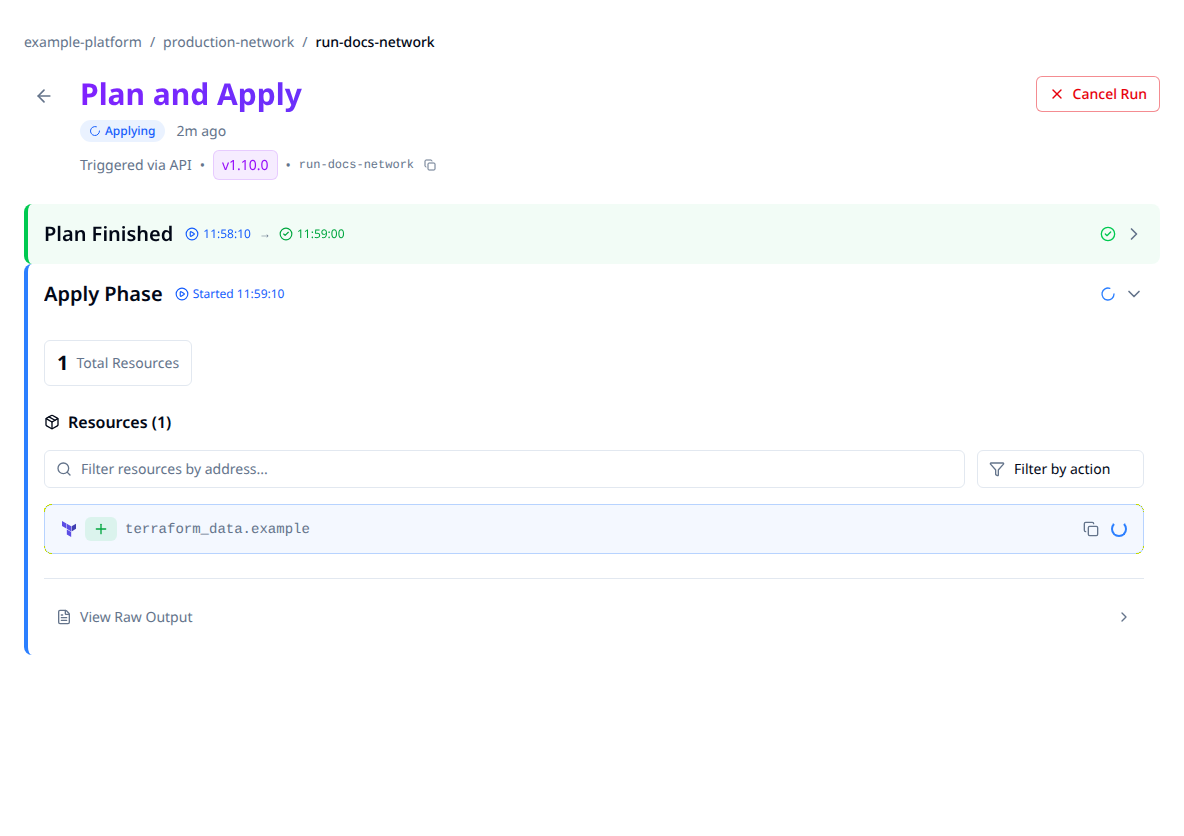
Synthetic run data in the real viewer. Read the run's status alongside its resource events; a progress row is not a completed operation.
Follow a run in the UI
- Open the workspace's Runs tab and select the run.
- Review the plan phase for refresh messages, proposed resource changes, diagnostics and the add/change/destroy summary.
- For a run that enters apply, follow its separate apply phase and resource progress.
- Check the final run status and any error. Reopen the run to inspect the stored result.
During planning, the default view can show a progress indicator until structured plan data is ready. To see terminal output during that phase, enable Show Terminal During Planning under Settings > Preferences > Run Display Options. That preference changes presentation, not execution.
The browser polls for new log bytes. Updates are near-live rather than a guaranteed instantaneous delivery, and a quiet output panel can mean that a provider has no new text. Terraform/OpenTofu run directly from a terminal can also stream output; Stackweaver adds the shared run page and stored phase history.
Read plan and apply logs through the API
Use an API token with access to this run's workspace. Set STACKWEAVER_API_URL to the API
origin, without /api/v2, and RUN_ID to the run ID from its page:
Plan output
curl --fail-with-body \
  --header "Authorization: Bearer $STACKWEAVER_TOKEN" \
  "$STACKWEAVER_API_URL/api/v2/runs/$RUN_ID/logs/plan"
Apply output
curl --fail-with-body \
  --header "Authorization: Bearer $STACKWEAVER_TOKEN" \
  "$STACKWEAVER_API_URL/api/v2/runs/$RUN_ID/logs/apply"
The response is plain-text phase output framed by STX (0x02) at the start and ETX
(0x03) at completion. A log client must strip those bytes for display but include them
when advancing byte offsets; it should not interpret an empty response as a completed run.
The phase can have no output yet. Read the run record for lifecycle status:
curl --fail-with-body \
  --header "Authorization: Bearer $STACKWEAVER_TOKEN" \
  "$STACKWEAVER_API_URL/api/v2/runs/$RUN_ID"
For incremental reads, send offset and optional limit as raw byte counts, not
character positions. Advance by bytes received and keep separate offsets for plan and apply.
A completed stream uses an end-of-text marker; the web viewer handles this automatically.
The generic logs endpoint also accepts an explicit phase:
curl --fail-with-body --get \
  --header "Authorization: Bearer $STACKWEAVER_TOKEN" \
  --data-urlencode 'phase=plan' --data-urlencode 'offset=0' \
  --data-urlencode 'limit=65536' \
  "$STACKWEAVER_API_URL/api/v2/runs/$RUN_ID/logs"
Terraform providers manage configuration or run resources; they are not a log-tail interface. There is no YAML setting or Stackweaver CLI command required for this view. The API explorer lists the full operation schemas.
Stored output and troubleshooting
Output is buffered while the run executes and persisted for later access. Stored logs remain subject to the run's availability and deployment storage/retention policies; this is not a promise that every log is kept forever.
| Symptom | Next check |
|---|---|
| Plan is still running but the page shows no terminal. | Check your terminal-during-planning preference and the plan log endpoint. |
| Log request is empty. | Check the run status, selected phase and byte offset. That phase may not have emitted output. |
| Apply output is absent. | Confirm the run entered apply; plan-only runs never do. |
| Output stops updating. | Check API connectivity and runner status before assuming the operation stopped. |
| Run is failed or canceled. | Review the phase output and saved state before retrying; a partial apply can leave resources. |
Use Understanding runs for operation choices and phase interpretation, Cancellation to stop eligible work, and Run timeouts for execution limits.